DigitalXLR Homepage Update: Introducing AI-Assisted Generation
DigitalXLR has redesigned its homepage to focus on AI-assisted generation, separating content creation from content management. The main site (digitalxlr.com) now serves as an AI creative partner for generating videos and images, while DigitalXLR Studio (digitalxlr.com/studio) houses your creative library of past creations.
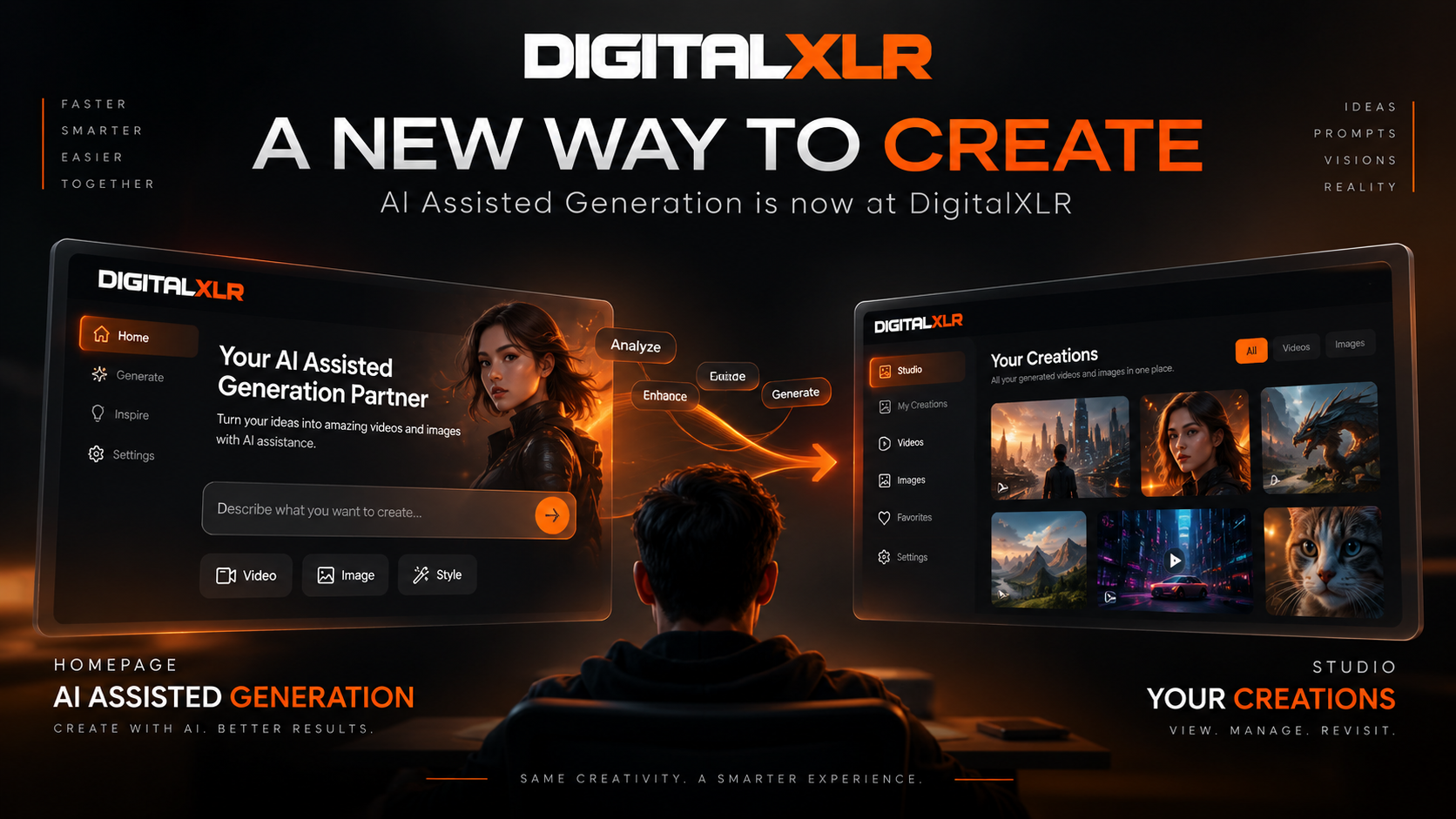
DigitalXLR is evolving to make AI-powered content creation simpler, faster, and more intuitive. As part of this update, we have redesigned the role of the DigitalXLR homepage and introduced a clearer separation between AI-assisted generation and your creative library.
DigitalXLR Is Now Your AI-Assisted Generation Partner
When you visit digitalxlr.com, you will now enter the new DigitalXLR AI-assisted generation experience. The homepage is designed around one primary purpose: helping you turn your ideas into videos and images with the assistance of AI.
Instead of simply providing generation tools, DigitalXLR is moving toward a more assisted creative workflow. Your prompts, references, ideas, and creative direction can be interpreted and supported by AI throughout the generation process.
Whether you are creating AI videos, generating images, exploring creative concepts, or transforming an idea into visual content, the new homepage is where your creative journey begins.
Start creating at digitalxlr.com.
AI-Assisted Generation for Better Creative Workflows
Creating content with generative AI can sometimes require more than simply entering a prompt. Understanding references, describing visual styles, defining movements, and communicating the intended result can all affect the final generation.
DigitalXLR's AI-assisted approach is designed to help bridge that gap.
The goal is to make AI video generation and AI image generation feel more natural by placing assistance directly into the creative workflow. Instead of treating AI as just a generation engine, DigitalXLR is building an experience where AI works alongside you as a creative generation partner.
This means you can focus more on your idea and less on figuring out exactly how to communicate every technical detail.
Introducing DigitalXLR Studio
While the homepage has become the new AI-assisted generation experience, your existing creative workspace has moved to digitalxlr.com/studio.
DigitalXLR Studio is now the dedicated place for your generated content. It brings your previous creations into one centralized creative library where you can return to the videos and images you have already generated.
If you have previously used DigitalXLR from the main homepage, Studio is where you will find the familiar experience of browsing your generated content.
Your Videos and Images in One Place
DigitalXLR Studio is designed to make managing generated content easier. Instead of combining the generation experience with your entire creative library, the new structure separates these two parts of the workflow.
The homepage is focused on creating new content with AI assistance, while Studio is focused on viewing and managing the content you have already created.
This separation makes it easier to understand where to go depending on what you want to accomplish.
Want to create something new? Start at digitalxlr.com.
Want to find something you already generated? Go to digitalxlr.com/studio.
A Simpler DigitalXLR Experience
The change represents an important step in the evolution of DigitalXLR. As AI video generation and AI image generation become more powerful, the creative process can become increasingly complex.
DigitalXLR is designed to simplify that experience by creating a clear path from idea to generation and from generation to your creative library.
The new homepage puts AI-assisted creation first, giving creators a dedicated environment for turning prompts and ideas into visual content. Studio then provides a separate space for revisiting and managing those creations.
What Is Changing at DigitalXLR?
The main DigitalXLR website, digitalxlr.com, is now centered around AI-assisted generation. This is the place to begin when you have a new idea and want to create an AI-generated video or image.
digitalxlr.com/studio is now the dedicated Creation Studio, where you can access your generated videos, generated images, previous creations, and creative work.
The easiest way to remember the new structure is simple:
DigitalXLR Homepage → Create with AI assistance.
DigitalXLR Studio → View and manage your creations.
Create With AI. Create Faster. Create With DigitalXLR.
DigitalXLR is continuing to build toward a more intelligent approach to AI content creation. The new homepage is the beginning of that experience, giving creators a dedicated AI-assisted environment for transforming ideas into videos and images.
Your creative library is still there. Your previous creations are still accessible through Studio. What has changed is how the experience is organized to make creation and content management clearer.
Whether you are an AI creator, content creator, marketer, designer, filmmaker, or simply experimenting with generative AI, DigitalXLR is designed to help you move from an idea to visual content more efficiently.
Start creating with DigitalXLR at digitalxlr.com.
Explore your creations at digitalxlr.com/studio.
Frequently Asked Questions (FAQ)
Q: What is the difference between DigitalXLR and DigitalXLR Studio?
DigitalXLR (digitalxlr.com) is now the AI-assisted generation experience for creating new videos and images. DigitalXLR Studio (digitalxlr.com/studio) is your dedicated creative library for viewing and managing previously generated content.
Q: How does AI-assisted generation work on DigitalXLR?
DigitalXLR's AI-assisted generation interprets your prompts, references, ideas, and creative direction throughout the process, working alongside you as a creative partner rather than just executing technical commands.
Q: Where do I find my previously generated videos and images?
Your existing creations have moved to digitalxlr.com/studio. This centralized creative library contains all your previously generated videos, images, and past creative work.
Q: Why did DigitalXLR separate generation from the creative library?
The separation creates clearer workflows: the homepage focuses purely on AI-assisted creation, while Studio handles content management. This simplifies navigation and reduces complexity as AI generation capabilities expand.