DigitalXLR Expands Its AI Creation Platform With Nano Banana 2, Community and New Video Workflows
DigitalXLR has launched a major platform update integrating Google Nano Banana 2 for 1K image generation, a new Community platform for creator discovery, and Recreate This Video workflows. The release connects image generation, AI video production with Seedance 2.5, and social publishing into a unified creative environment where creators can develop visual concepts into finished productions without switching platforms.
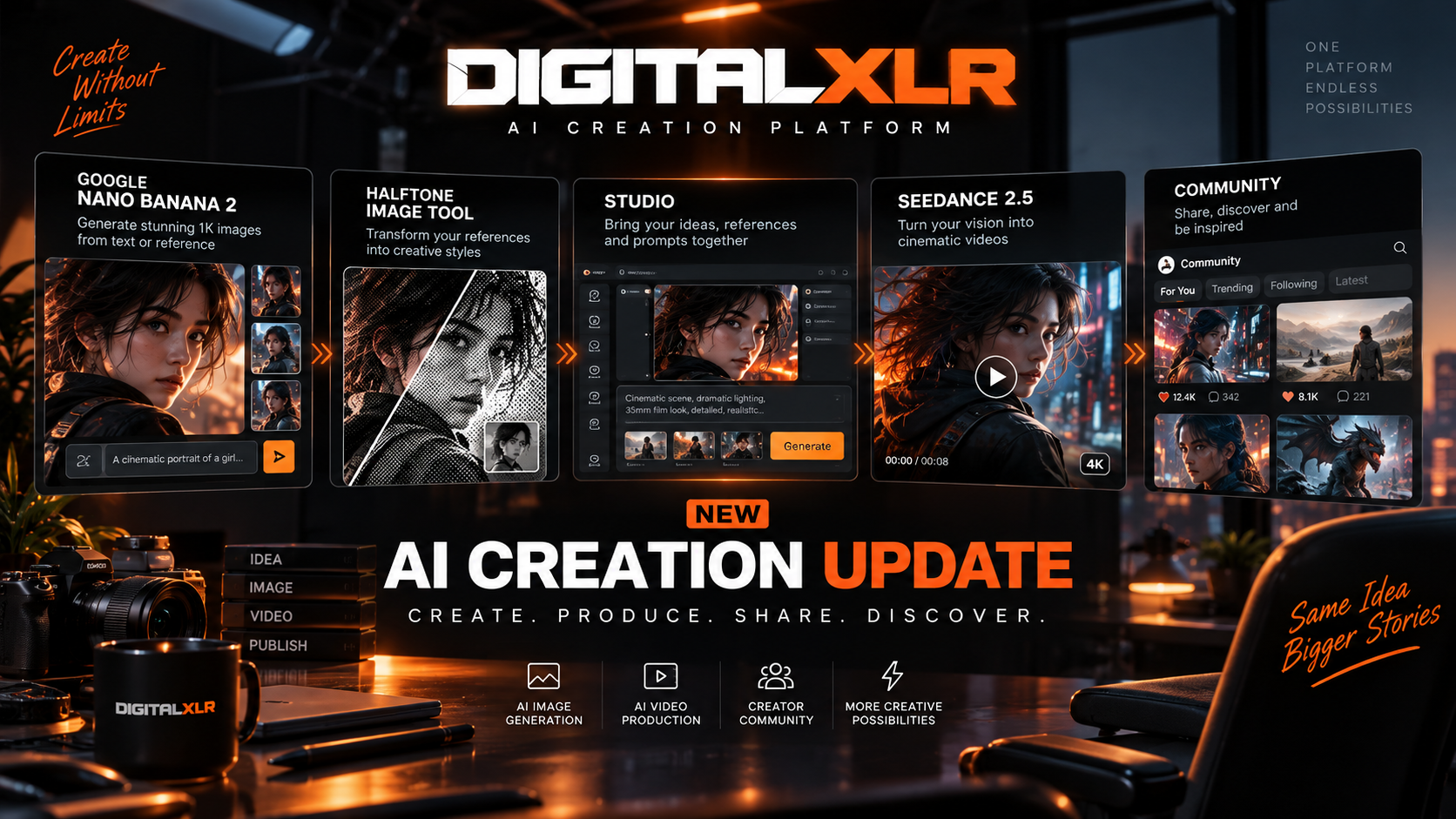
DigitalXLR is introducing a major set of new capabilities designed to bring image generation, AI video production, creative experimentation, and creator discovery into one connected workflow. The latest update adds Google Nano Banana 2, a new Community platform, Recreate This Video, the Halftone Image Tool, and expanded workflows for creating cinematic content with Seedance 2.5.
The update reflects a broader direction for DigitalXLR. Rather than positioning AI image and video generation as isolated tools, DigitalXLR is building an environment where creators can move from an initial idea to a finished production without constantly switching between different platforms. A visual concept can be generated, developed into a reference, brought into Studio, transformed into a video, and ultimately published for other creators to discover.
Google Nano Banana 2 Comes to DigitalXLR
Google Nano Banana 2 is now available inside DigitalXLR, giving creators a new option for generating high-quality 1K images as part of their creative workflow. The integration supports both text-to-image and reference-to-image generation, allowing creators to approach image creation from either a completely new concept or an existing visual direction.
With text-to-image generation, creators can describe the scene they want through a prompt and generate an image without providing a reference. This makes the model useful during the earliest stage of an idea, when a creator may still be exploring characters, environments, compositions, lighting, or overall visual direction.
Reference-to-image generation provides a different workflow. Instead of relying entirely on text, creators can provide reference material and use it to guide the generated result. This becomes particularly useful when developing visual concepts that need to maintain specific characteristics or when an existing image is an important part of the creative direction.
For AI video creators, this image-generation stage can be especially valuable because it allows the visual foundation of a production to be established before moving into motion.
Creating the Visual Foundation Before Video Production
AI video generation often starts with a prompt, but creators increasingly need more control over the visual identity of their productions. A character may need to look a particular way, an environment may need to establish a specific atmosphere, or a scene may require a carefully defined composition before it is animated.
This is where the combination of Nano Banana 2 and DigitalXLR Studio becomes important.
A creator can develop an image first, experiment with different visual directions, and select a reference that represents the intended production. That reference can then be introduced into Studio as part of the video-generation process. Instead of asking the video model to invent every visual detail independently, the creator can establish a visual starting point and build the motion and cinematography around it.
This creates a more connected creative workflow between image generation and video production. The image is no longer simply the final output of an image-generation session; it can become a production asset that continues to be useful throughout the rest of the project.
DigitalXLR Community Introduces a New Way to Showcase AI Productions
Alongside the new generation capabilities, DigitalXLR is also launching its Community experience, giving creators a dedicated place to share and discover AI-generated productions.
The new Community allows creators to upload high-definition videos of up to 100MB and present their work through a dedicated showcase experience. Creator profiles provide a place for users to build a catalog of their productions, while the broader Community makes it possible to discover work from other creators.
This adds an important social layer to DigitalXLR. AI generation is no longer limited to creating something privately inside the Studio. Once a production is complete, creators can publish it, build a public portfolio around their work, and allow other people to discover what they are making.
For viewers, Community becomes a source of creative inspiration. Instead of repeatedly starting from a blank prompt, creators can see what other people are producing and explore different approaches to storytelling, cinematography, visual design, and AI-assisted production.
Recreate This Video Turns Inspiration Into an Interactive Workflow
One of the more distinctive features of the new Community is Recreate This Video. The feature allows creators to take an existing Community production and use its creative setup as a starting point inside DigitalXLR Studio.
When a production is available for recreation, the relevant prompt information and associated attachments can be brought into the Studio composer. This removes much of the manual work normally required when trying to reproduce or study an AI-generated production.
More importantly, it makes Community interactive. A creator can discover a video they find interesting, open its recreation workflow, and immediately begin experimenting with the underlying creative direction. They can then adapt the concept rather than simply trying to guess how the original production was created.
For example, a creator might discover a video with an interesting cinematic composition and use the recreation workflow to experiment with a different character or setting. Another creator might take the same foundation and completely change the story, camera movement, lighting, or visual style.
The result is a more practical relationship between published content and creation. Community becomes not only a place where creators show their work, but also a place where other creators can study ideas, experiment with workflows, and develop their own interpretations.
The Halftone Image Tool Adds Another Creative Layer
DigitalXLR's latest update also introduces the Halftone Image Tool, providing creators with another way to transform reference imagery during the creative process.
The tool applies a halftone treatment to an image, producing a distinctive graphic appearance that can be used as part of visual development and experimentation. This can be useful for creators exploring stylized references, graphic-inspired visuals, concept development, or alternative visual treatments before moving into video generation.
The addition of image transformation tools is part of a larger idea behind the DigitalXLR workflow: creators should have more ways to manipulate and develop their visual references before they become part of a finished production.
Instead of treating an uploaded image as a fixed asset, creators can experiment with how that reference is represented and how it fits into the overall visual direction of a project.
Building Cinematic Videos With Seedance 2.5
Once the visual direction has been established, creators can continue into video production using Seedance 2.5 through DigitalXLR Studio.
The combination of visual references and detailed prompting gives creators a way to develop more intentional cinematic sequences. Rather than relying only on a short text description, creators can define the subject, environment, action, camera behavior, lighting, atmosphere, and overall production style while also providing visual information to guide the generation.
This makes the workflow suitable for everything from short cinematic scenes and character-driven sequences to experimental AI productions and social media content.
The important change is that image generation and video generation no longer have to be treated as completely separate stages. Nano Banana 2 can help establish the visual direction, Studio can bring that direction into the production workflow, and Seedance 2.5 can turn the concept into motion.
From Creation to Publishing
The new DigitalXLR workflow becomes even more interesting when Community is included at the end of the process.
A creator can begin with an idea and use Nano Banana 2 to explore the visual concept. Once a suitable reference has been developed, that image can be brought into Studio and incorporated into a Seedance 2.5 video workflow. After the production is complete, the creator can publish the result to Community, where other users can discover it.
That production can then become inspiration for someone else.
Another creator may discover the video and use Recreate This Video to bring its creative setup into Studio. They can modify the concept, introduce their own references, and create a completely different production based on the same starting point.
This creates a continuous loop between creation and discovery. A creator's finished work can become another creator's starting point, which can eventually become another published production.
A More Connected AI Creation Experience
The significance of this update is therefore not limited to any single feature. Nano Banana 2 expands DigitalXLR's image-generation capabilities, while Seedance 2.5 provides the foundation for cinematic AI video production. Studio connects those stages, the Halftone Image Tool adds another creative transformation option, and Community gives creators somewhere to publish and discover the results.
Recreate This Video takes that ecosystem one step further by connecting published productions back to the creation process.
The overall experience is designed around how AI creators actually work. Ideas rarely arrive as perfectly formed video prompts. A creator may start with an image, change the concept several times, experiment with references, discover a better visual direction, and only then decide what the final video should look like.
DigitalXLR is making that process easier to manage inside a single creative environment.
DigitalXLR Is Building More Than an AI Generator
The latest update represents a broader evolution of DigitalXLR from an AI generation platform into a more complete creator ecosystem.
Image generation provides the starting point. Reference workflows help creators establish visual direction. Studio provides the production environment. Seedance 2.5 turns those ideas into video. Community provides a place to publish the finished work, while Recreate This Video creates a connection between discovering content and creating something new.
That connection is ultimately what makes the update different.
The goal is not simply to give creators another model to generate images or another tool to generate videos. It is to reduce the distance between having an idea and turning that idea into something people can actually see, experience, and build upon.
With Google Nano Banana 2, DigitalXLR Community, Recreate This Video, the Halftone Image Tool, and expanded Seedance 2.5 workflows now coming together, DigitalXLR is continuing to build toward a platform where creators can generate, develop, produce, publish, and discover AI content within one connected ecosystem.
And today's update is another major step in that direction.
Frequently Asked Questions (FAQ)
Q: What is Google Nano Banana 2 in DigitalXLR?
Google Nano Banana 2 is an integrated image generation model in DigitalXLR that creates high-quality 1K images using text-to-image or reference-to-image prompts, serving as a visual foundation for AI video production.
Q: How does DigitalXLR connect image and video generation workflows?
DigitalXLR allows creators to generate images with Nano Banana 2, develop them into production references, and directly import those references into Studio for Seedance 2.5 video generation—eliminating platform switching.
Q: What can creators do with the new DigitalXLR Community platform?
The Community platform lets creators upload HD videos up to 100MB, build showcase profiles with production catalogs, and discover AI-generated content from other creators—adding social publishing to the creation workflow.
Q: What is Recreate This Video in DigitalXLR?
Recreate This Video is a new workflow feature that enables creators to use existing video content as a reference or starting point for generating new AI-powered cinematic productions with Seedance 2.5.